
Collect the data
Take the mobile programmer to the lock you wish to collect the records from
1) Press FUN x 2 *The programmer will display collect recorders
2) Press RUN
3) Hold to lock induction area, you might have to adjust the position of the mobile programmer for the best alignment of IR (infrared) readers to successful download.
4) It will retrieve the last 512 unlocking records. (the Mobile Programmer will count up consecutively during this time)
5) Wait until you see confirmation message, and 1 long beep is heard
View the Data
The following five stats can be achieved:
- Battery Voltage Check
- Date Time Check
- Room Identification Data
- Error Diagnosis Code
- Audit History
- Press FUN x 2 *The programmer
- Screen will display
-
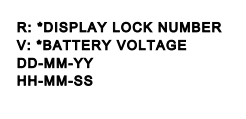
- Immediately after pressing FUN x 2, Press the number 2
- Review Fault Codes
Check Error Code
|
Error Code
|
Door Data Error Messages
|
Definition
|
|
0
|
Card Number Error
|
The wrong card was used i.e. 112 room card used on 202 Lock
|
|
1
|
Code Invalid
|
Card has been issued over i.e. ISSUE card not additional card has been used
|
|
2
|
Time limited <END>
|
The card is expired or blank
|
|
3
|
Locks on the other side
|
Privacy latch is engaged
|
|
4
|
Start Time Error
|
Check the time clock on lock
|
|
5
|
Unlock period time error
|
Check period of time on key. Download door data and re-program lock
|
|
6
|
Card invalid
|
Valid card has been stopped by limit card
|
|
7
|
Data in card
|
Card with wrong MCSC/Lock with wrong MCSC
|
|
8
|
Emergency administrator error
|
Issue the emergency administrator card again, or the door lock never unlock with the guest key.
|
|
9
|
Card key can’t unlock VIP room
|
The card key just can only unlock the guest room, without the VIP function
|
|
P
|
No Error
|
Valid card used. No error registered
|