
Back to knowledgebase

LMS Software – How to take a back up of LMS Database on a local computer

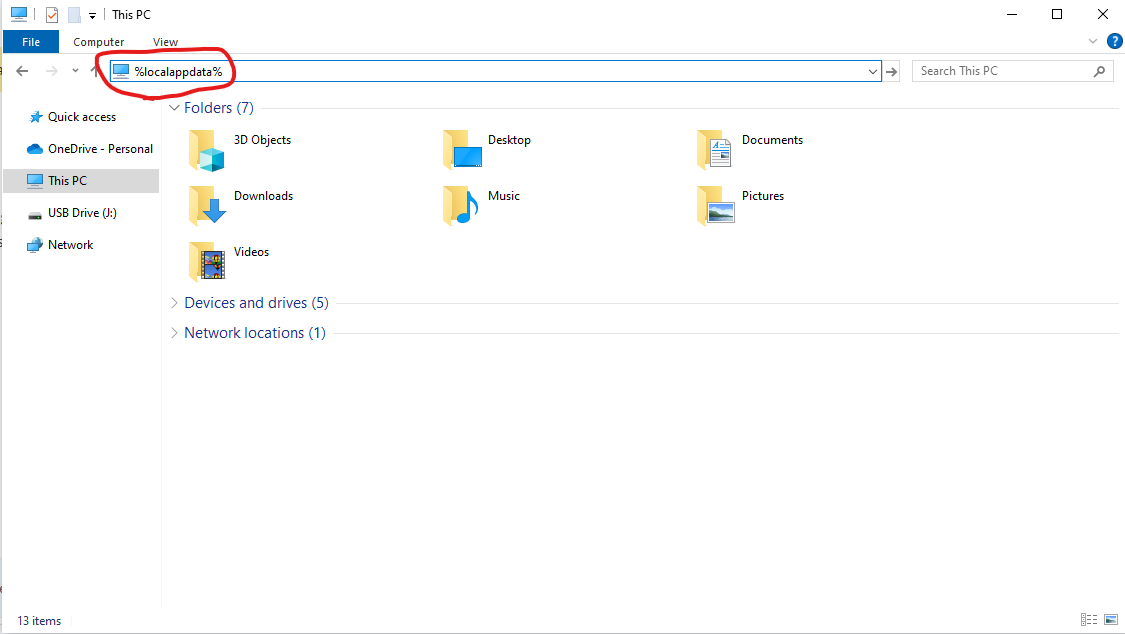
These are instructions for a local database, not an SQL-based database. Instructions Close the LMS software. Open any folder and navigate to the top address bar. Type "%localappdata%" in it (see image). Navigate to "Virtual StoreProgram FilesKAS". ...

Popular searches

Browse by area

Browse by product

Popular intents

Notes

These are instructions for a local database, not an SQL-based database.

Instructions

  1. Close the LMS software.
  2. Open any folder and navigate to the top address bar.
  3. Type "%localappdata%" in it (see image).
  4. Navigate to "Virtual StoreProgram FilesKAS".
    • If "Virtual Store" does not exist, the files are likely located in their other default location: "C:Program FilesKAS"
  • Copy contents of the folder.
  • Once LMS is installed on the new computer, repeat steps 2-4 and then paste the copied files.
  • Ensure the backup is working by launching LMS.
  • Related articles

    29 Jun 20262 min read

    PDA – User Manual

    (PDA) MANUAL The following pictures are the basic configurations of our handset: Data line------------------------------------------------1 piece Touch pen----------------------------------------------1 piece ...

    29 Jun 20261 min read

    Replacing the Batteries

    Replacing the Batteries Batteries are recommended be replaced every 12 months. [Figure 11.3 on User Manual] Replacing batteries will not loose any stored data Remove battery cover by sliding it upward Remove old batteries and replace with new ones ...