
By System Card
- Locate the original System Card used to initially program the door. Note: you cannot use the PDA.
- Swipe the System Card once -> Red LED with rising tone
- Swipe the System card again -> Green LED with a single beep
- The lock is now factory reset, all cards will not be invalid.
By Reset Switch
- Remove the lock from the door.
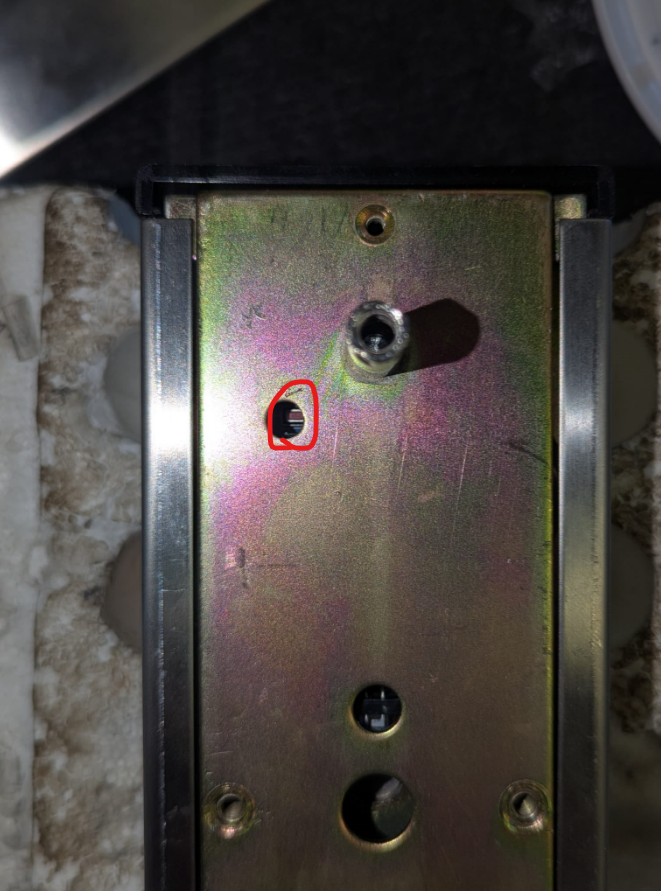
- Press the SWITCH inside the slot on the front panel.
- If you cannot see the hole as pictured (top left), you may need to completely remove the back panel.
- Continue pressing the SWITCH until you hear the lock respond with a buzz tone
Result
- The lock is now factory reset, all cards/pin codes will now be invalid.
- all data and has been cleared from the device
- In order to get the lock working, you will need to reprogram the door
- If you are using Bluetooth, you will need to re-active the Lock using the Lock Keeper App and set the room number again. Go to the ‘Setup’ tab in the Lock Keeper App.