Back to knowledgebase

Getting your RMS Custom Field Name.

Premise Once you're ready to integrate your RMS account with KAS Access, you will need your RMS "Custom Field Name" in order to be able to receive PINs back from KAS (if you wish). This means that once a PIN is generated, it will be sent back to the ...

Popular searches

Browse by area

Browse by product

Popular intents

Premise

Once you’re ready to integrate your RMS account with KAS Access, you will need your RMS "Custom Field Name" in order to be able to receive PINs back from KAS (if you wish).
This means that once a PIN is generated, it will be sent back to the booking’s Custom Field, which you will be able to view (or change).
Steps

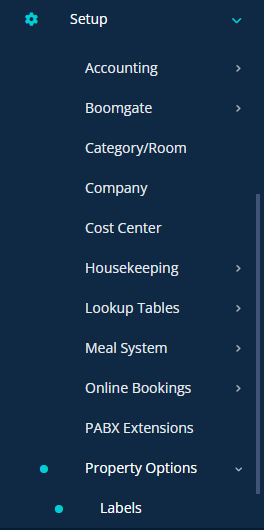
1) Log into your RMS Account, and select "Setup -> Property Options -> Labels"

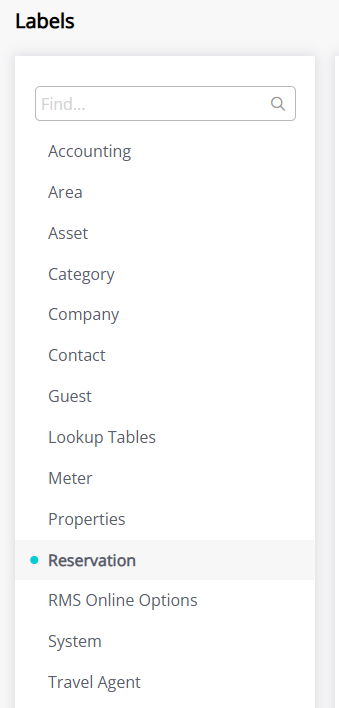
2) Head to "Reservation"

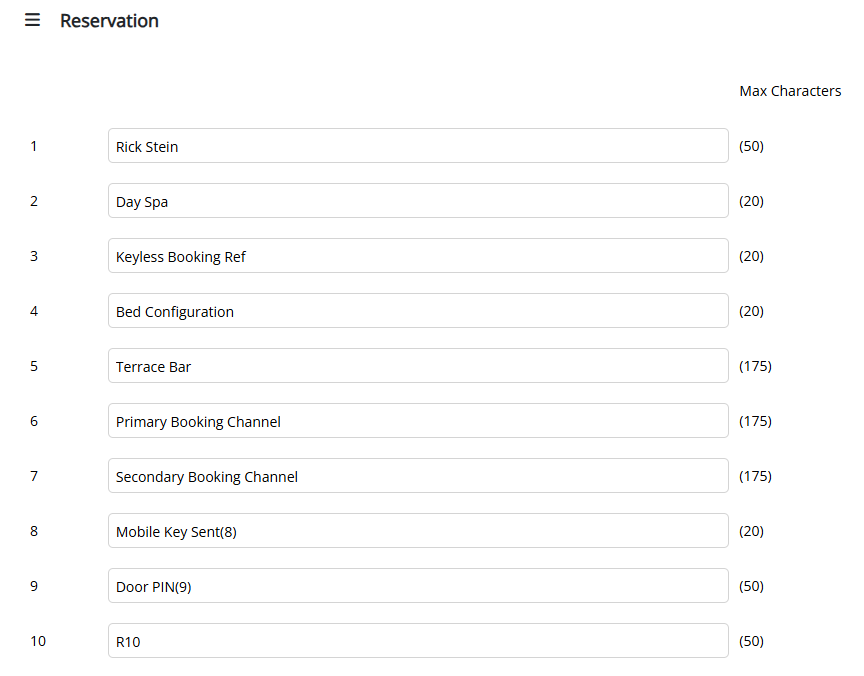
3) Note the field number you wish to use as your Custom Field for PINs, and name it as something you’ll recognise

4) When asked for the Field Number in the sign-up form, write the number of the field ( e.g. 9 ).

Related articles

4 Aug 20264 min read

KASAccess Inner Range Integriti Integration. White Paper

Integration Between KASAccess and Inner Range (Integriti)   1. Executive Summary This white paper describes the integration between KASAccess, the cloud-based access control platform developed by KAS – Keyless Access Security, and Inner Range’s Integriti The integration is intended to enable control of Inner Range Access Control Readers (ACRs) via the Integriti System through the […]

5 Sep 20253 min read

Scheduling Keys

Premise This documentation will explain how to schedule keys using the "Frequency" function in KAS Access It will allow you to have a key for a particular user active on a certain schedule. Examples: Example 1: "MaintenanceUser" needs access to ...