Back to knowledgebase

32-Channel RS485 NC/NO lift controller Installation

Premise This configuration guide will describe how to configure and wire the 32-Channel RS485 NC/NO lift controller with the NEO ACR V2 Specifications Relay output parameters Refer to the following table according to different brands and different ...

Premise

This configuration guide will describe how to configure and wire the 32-Channel RS485 NC/NO lift controller with the NEO ACR V2

Specifications

Refer to the following table according to different brands
and different models. Check list for relay parameters (loop voltage 12V/24V)

Check list for relay parameters (loop
voltage 12V/24V)

Brand

Model

Contact
Type

Contact
Volume

OMROM

G2R-1 (w/
base)

Open and
Close

10A / 250V AC

10A / 30AV DC

Output transistor model: IRF9540N (Field-effect tube)

Load voltage: 12~24VDC

Continuous load current: <=2A (with radiator)

Instant maximum current: 16A (continuous time 300mS)

Output type: output voltage after trigger : 12~24VDC;
Floating without trigger

Output insulation: sustainable voltage±1500V

Output indicator: attached


Input way: compatible with NPN/PNP

Triggering voltage: 3.3V / 5V / 12V / 24V optional

Input insulation: Sustainable voltage ±1500V

Input indicator: attached


Working voltage: default voltage: 24V; 12V optional

Maximum voltage: 24V(18~30V) / 12V(10~15V)

Current requirement: relay output mode 0.2A (4 paths
triggered)

0.95 A (32 paths triggered)

transistor output mode 0.5A(16 paths triggered)

pure input mode: 0.3A(32 paths triggered)

Reverse connection protection: all products applicable


Insulation: all insulated

Insulation voltage: ±1500V

Communication protocol: Modbus-RTU

Baud Rate1200/2400/4800/9600/19200/38400/57600/115200
BPS

Data format: 1 start byte 8 data bytes parity checking, 1 or
2 stop bytes

Maximum panel points: 32 modules sharing the BUS

Transmission distance: ≥800M (Double twisted cable)

Screening terminals: support

Wiring

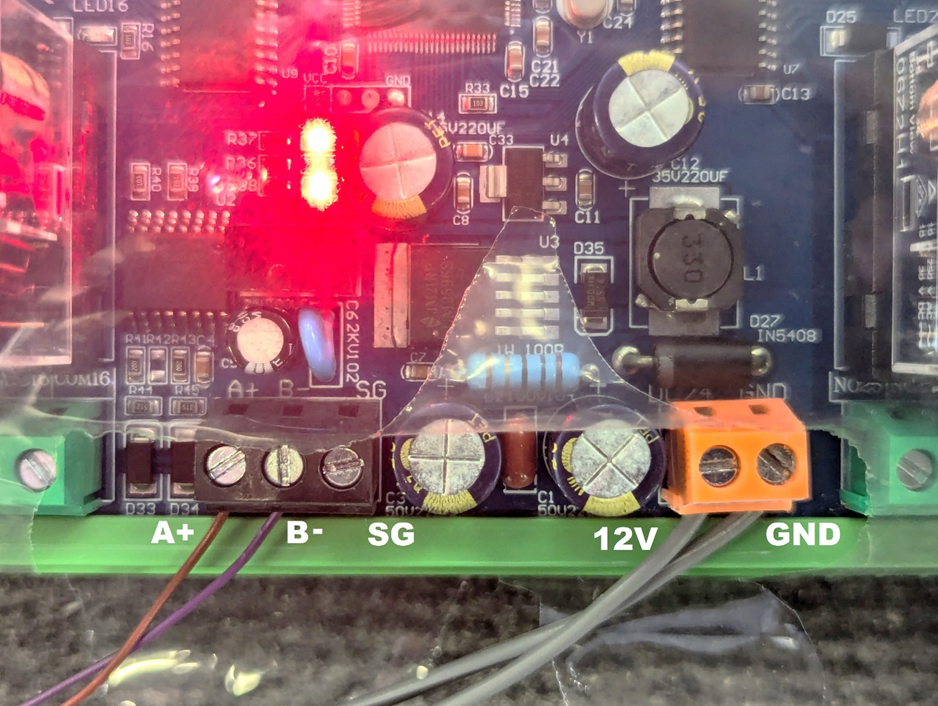
ACR RS485A (Brown) to A+ on the relay
ACR RS485B (Purple) to B- on the relay
12V and GND as marked (from external power supply)
SG – Common Ground with GND (Not necessary for the ACR V2)

DIP Switch Configuration

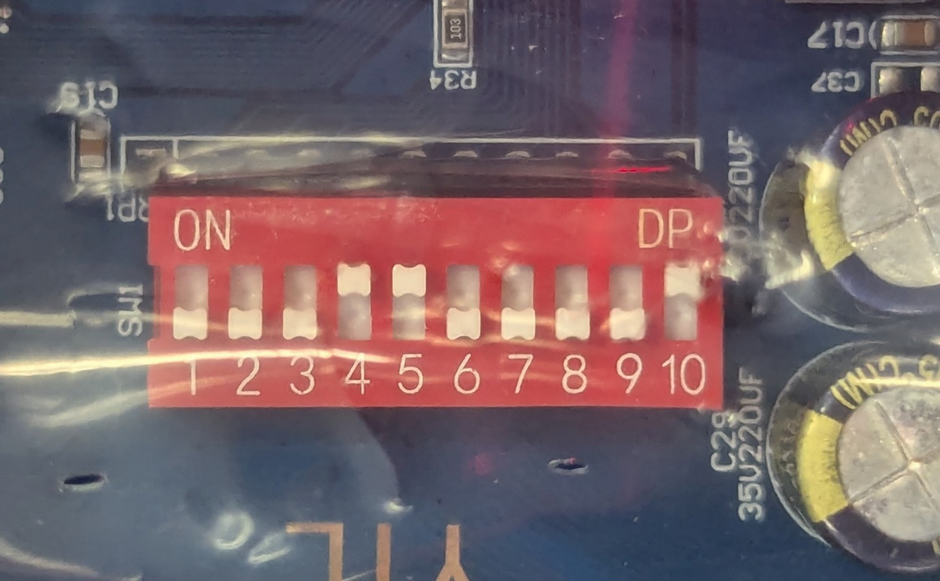
For the purpose of operation with the KAS ACR V2, the DIP Switch configuration is as follows:
For the purpose of operation with 3rd party products, below is are the settings for the DIP switches:

Pins 1-2: Data Verification

Verification Type

Pin 1

Pin 2

No Verification 1 stop byte

OFF

OFF

No Verification 2 stop bytes

OFF

ON

Odd Verification 1 stop byte

ON

OFF

Even Verification 1 stop byte

ON

ON

Pins 3-5: Baud Rate

Baud Rate

Pin 3

Pin 4

Pin 5

1200

OFF

OFF

OFF

2400

OFF

OFF

ON

4800

OFF

ON

OFF

9600

OFF

ON

ON

19200

ON

OFF

OFF

38400

ON

OFF

ON

115200

ON

ON

ON


Pins 6-10: Relay Index Number (Module Hardware
Address)

Index Number

Pin 6

Pin 7

Pin 8

Pin 9

Pin 10

0

OFF

OFF

OFF

OFF

OFF

1

OFF

OFF

OFF

OFF

ON

2

OFF

OFF

OFF

ON

OFF

3

OFF

OFF

OFF

ON

ON

4

OFF

OFF

ON

OFF

OFF

5

OFF

OFF

ON

OFF

ON

6

OFF

OFF

ON

ON

OFF

7

OFF

OFF

ON

ON

ON

8

OFF

ON

OFF

OFF

OFF

9

OFF

ON

OFF

OFF

ON

10

OFF

ON

OFF

ON

OFF

11

OFF

ON

OFF

ON

ON

12

OFF

ON

ON

OFF

OFF

13

OFF

ON

ON

OFF

ON

14

OFF

ON

ON

ON

OFF

15

OFF

ON

ON

ON

ON

16

ON

OFF

OFF

OFF

OFF

17

ON

OFF

OFF

OFF

ON

18

ON

OFF

OFF

ON

OFF

19

ON

OFF

OFF

ON

ON

20

ON

OFF

ON

OFF

OFF

21

ON

OFF

ON

OFF

ON

22

ON

OFF

ON

ON

OFF

23

ON

OFF

ON

ON

ON

24

ON

ON

OFF

OFF

OFF

25

ON

ON

OFF

OFF

ON

26

ON

ON

OFF

ON

OFF

27

ON

ON

OFF

ON

ON

28

ON

ON

ON

OFF

OFF

29

ON

ON

ON

OFF

ON

30

ON

ON

ON

ON

OFF

31

ON

ON

ON

ON

ON


Related articles

13 Jan 20253 min read

ACR / NEO Lock Troubleshooting Guide

Premise This troubleshooting guide will have a collection of various errors that you may encounter when using the NEO Lock. Please refer to the Table of Content to locate your issue. Troubleshooting Can't pair the ACR/lock to the app If the lock does ...

17 May 20212 min read

Neo Cloud Lock/ACR – Demonstration

Preface This demonstration KAS Lock has been programmed with the following access credentials: Pin code Wake up the keypad by touching the keypad (using the back of your hand) Press 1234# RFID Cards and FOBs Move the RFID Card or Fob towards the ...