

This product has been superseded with the Sub1 Gateway.
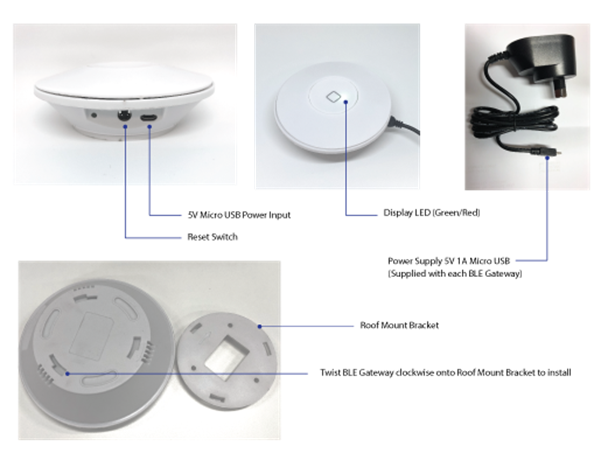
Installation:
· BLE
Gateway installed on the roof above the position of a BLE ACS Reader
· Distance
from BLE ACS to BLE Gateway
o Maximum:
10m radius line-of-sight. BLE Gateway -> BLE ACS
o Recommended
Maximum: 6m radius. BLE Gateway -> BLE ACS
· Must be
installed under cover – BLE Gateway not weatherproof
· BLE
Gateway must have connectivity to building WIFI
· Install a
GPO at the specified BLE Gateway position for power
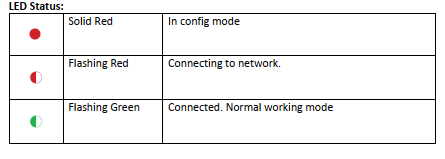
 The following parameters are ‘guides’ for Gateway positioning for site installation and configuration.KAS recommends the following parameters but can not guarantee the performance due to each sites specific nature
Example layout:

BLE Gateway:
- The number of devices: max 15 locks to 1 gateway, recommended 10 locks to 1 gateway.
- Working radius: max 10 m (-90 RSSI) radial working distance, recommended 6 m (-85 RSSI) radial working distance
- Recommended working BLE signal strength; max -40 RSSI, min -90 RSSI (Absolute max -95 RSSI)
- WIFI signal: connect to any active WIFI network using WIFI name and WIFI password. The gateway must be in strong WIFI network range
- Frequency: 2.4 GHz (BLE, WIFI)
- Power: 5V Power adapter (supplied)
 *Use these as a ‘guide’ only. Parameters are tested by KAS.
Notes:
- Distance is an approximate calculation from lock signal strength. The distances stated on this page are based on line-of-sight with no penetration or object interference, unless specified.
- If the gateway is mapped to a lock to travel around corners you will need to reduce the working distance because signal strength will drop around corners.
-
WIFI signal (Gateway -> Internet) is quite an important parameter. Don’t forget to consider the gateway position relative to the building WIFI router:
- Gateway -> Lock
- Gateway -> WIFI router
- If the WIFI signal to the gateway is poor, the gateway will not perform well.
Setup:
Click Here on how to setup gateway from the APP
To download PDF Click Here