Back to knowledgebase

Getting your RMS Custom Field Name.

Premise Once you're ready to integrate your RMS account with KAS Access, you will need your RMS "Custom Field Name" in order to be able to receive PINs back from KAS (if you wish). This means that once a PIN is generated, it will be sent back to the ...

Premise

Once you’re ready to integrate your RMS account with KAS Access, you will need your RMS "Custom Field Name" in order to be able to receive PINs back from KAS (if you wish).
This means that once a PIN is generated, it will be sent back to the booking’s Custom Field, which you will be able to view (or change).
Steps

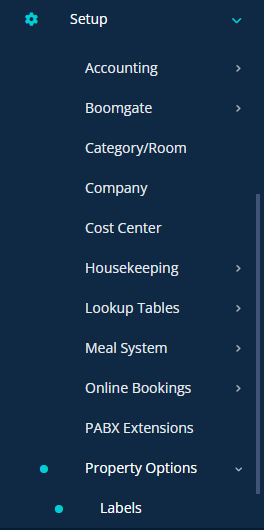
1) Log into your RMS Account, and select "Setup -> Property Options -> Labels"

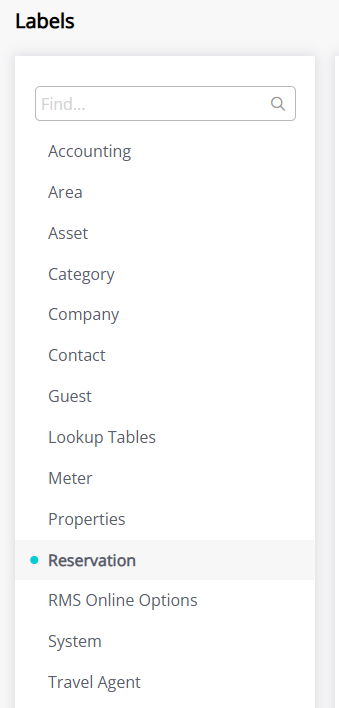
2) Head to "Reservation"

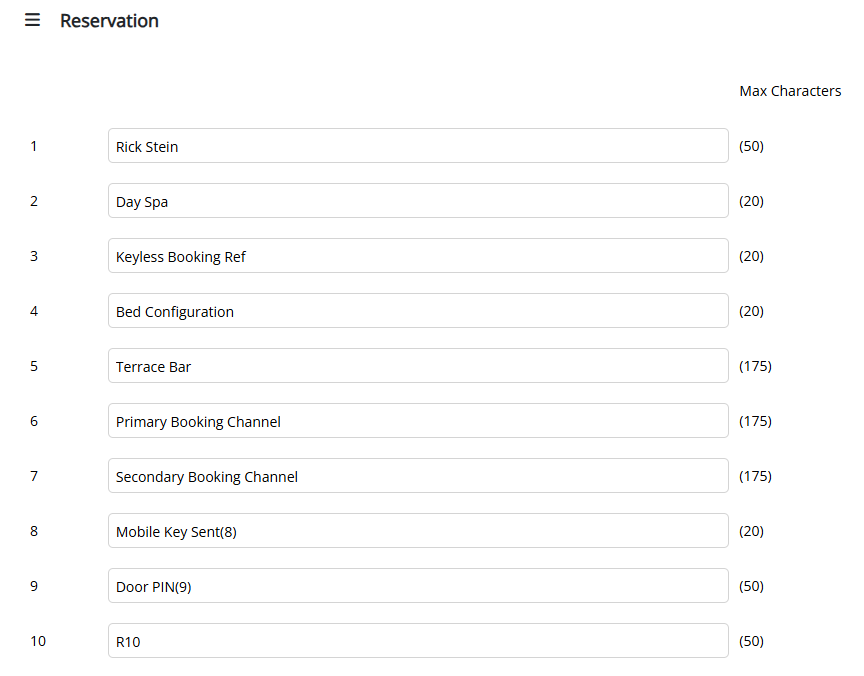
3) Note the field number you wish to use as your Custom Field for PINs, and name it as something you’ll recognise

4) When asked for the Field Number in the sign-up form, write the number of the field ( e.g. 9 ).

Related articles

5 Sep 20253 min read

Scheduling Keys

Premise This documentation will explain how to schedule keys using the "Frequency" function in KAS Access It will allow you to have a key for a particular user active on a certain schedule. Examples: Example 1: "MaintenanceUser" needs access to ...

10 May 20242 min read

Platinum Lock (KASAccess) – Specifications

7 Introduction The Platinum is a modern lock that appeals to the modern environment. It is a feature rich and durable lock hardware perfectly suitable to any type of accommodation site. It supports both the current KAS Access system and the ...