

IMPORTANT NOTES BEFORE YOU BEGIN
- ALWAYS TAKE A BACK UP OF YOU SOFTWARE BEFORE PERFORMING THE BELOW INSTRUCTIONS
- You may not be able to perform the below steps if you do not have this permission set
- Use the SYSTEM login credentials or Contact you upper management for login details as you may not have sufficient permission turned on
How to Resolve
From the Software….
If you already have a program card on hand and want to update
- Pop in the program card on the card reader.
- Click Operation
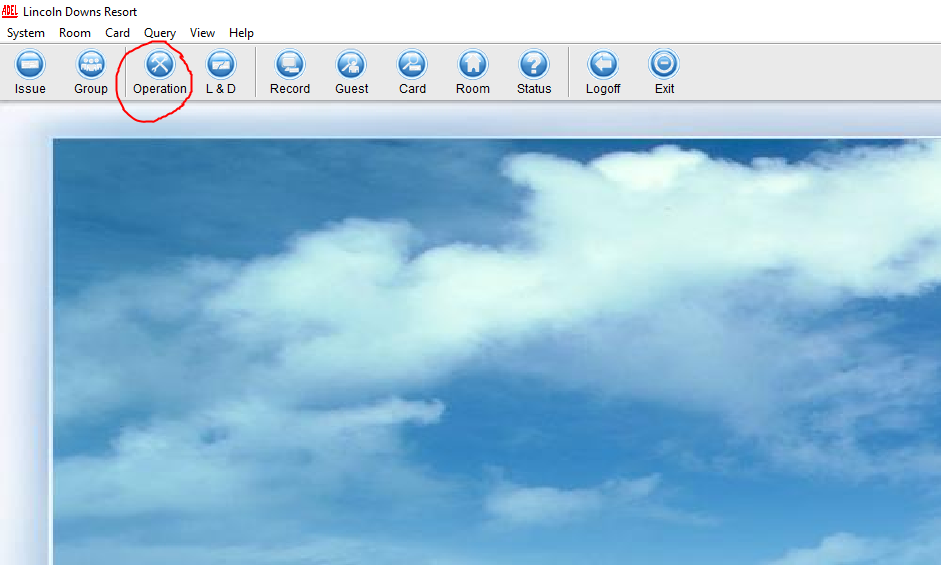
3.
Read the Card
Read the Card
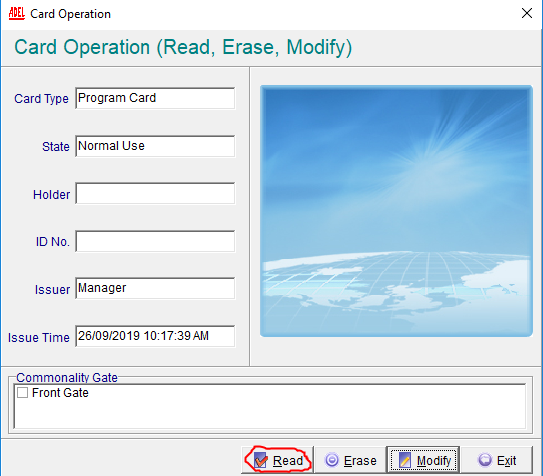
4.
Modify the card
Modify the card
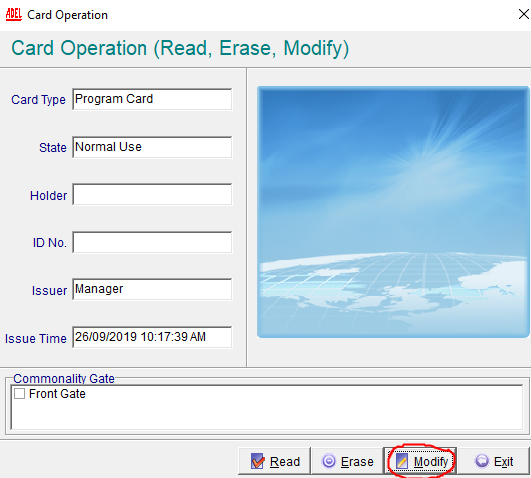

This card is now updated
If you do not have a program card on hand you will need to make the Program card ‘DAMAGED
A92 Software Clients need specific S70 cards labelled ‘PROGRAM CARD’ If you do not access to the specific card, you will need to contact KAS to order another one. Do not perform the below instructions without this card or your software will be unusable until you get the Program Card.- Go to Lost & Damaged
- Find the Program Card in the list
- Mark as DAMAGED.
- Go to Operation
- Issue Program Card
- This card is now updated
Notes
- This card will not unlock the door it will only update the lock
- If you are testing a card after you update the lock, ensure you wait until the lock goes out of updating mode, this should take about 3 seconds.
You may need to update the program card for the following reason;
- Master card has been lost or damaged in the system
- Master card has stopped working
- Needing to reprogram or update locks