
KAS Cloud App – Account Registration (Mobile App)

Hardware Installation
Account Registration (via Mobile App) and Hardware Activation is required before KAS Cloud Web Console is accessible.
Download and Install the KAS cloud App using QR code below.


Open the KAS Cloud App (on your mobile device)
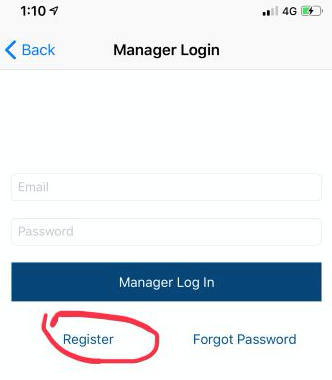
Click on Register to create a new account. (or Login using your credentials if your account has already been created)
KAS Cloud App Support
If you notice odd functionality for the KAS app, please conduct the following steps:
- Force quit the app. The app must be closed down completely and reopened.
- If the problem occurs, please take a screenshot of the error and email it to support@kas.com.au. KAS will contact you shortly after rectifying the problem.
Troubleshooting
Logging in errors:
- Mobile and Email must be unique for every user account.
- You cannot have two accounts and use the same Email or Mobile number for both accounts.
If you have trouble activating your lock:
- Ensure lock is powered
- Ensure you are pairing with the correct lock serial number (if you have multiple locks)
- Ensure serial number and is accurate. It is case sensitive.
- Touch the lock to wake up it BEFORE you tap 'Pairing' on the app.
Please click the link below
KAS Hardware Activation (Configuration)